
Create Personalized Business Posts in 10 Seconds!
Transform your brand with ready templates, quick videos and thousands of premium assets — all tailored for your business.

- 15,000+ Videos
- 2,50,000+ Posts
- 10,000+ Templates

How 365 Post Works
A simple workflow to create branded marketing posts fast — pick, brand, tweak and share.
Get Started
Open the 365 Post app or website and choose a template.
Select Category
Pick a category that fits your business — festival, product, service, or promo.
Select Brand Frame
Add your logo and business info to auto-brand templates.
Download & Share
Export HD images and share across social platforms.
Popular Features of Online 365 Post Application
365 Post comes packed with tons of features to help you perfect your photos. You can enhance photos, retouch portraits, remove backgrounds and apply effects. Take a look at our most popular application features.

Business Frame
Provide unique brand identity creation for each customer, aligning with their product or service offerings
Learn More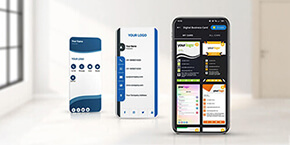
Digital business Card
Access to exclusively designed digital business cards that showcase your brand and contact details in a modern and engaging format.
Learn More
Collage Maker
Collage Maker Creativity: Tips and Tools for Designing Stunning Visuals and Graphics on Your Own.
Learn More
Make Your Video
Make Your Video Creativity: Tips and Tools for Designing Stunning Visuals and Graphics on Your Own.
Learn MoreWhy Choose 365 Post
We provide thousands of templates, localized languages and category-specific designs for instant marketing reach.
1,00,000+ Post Options
Huge variety to match any campaign.
200+ Business Categories
Templates tailored by industry & niche.
Available in Multiple Languages
Reach regional audiences with localized creatives.

Frequently Asked Questions
Quick answers to common questions about 365 Post.
Go to Account → Edit your brand frame. Upload PNG logo, business name and other details. You can add up to 5 frames.
Go to Account → Preferred Languages and select languages.
Go to Account → My Business and click the + icon. Free account limits may apply.
How 365 Post is talked about
Thank you 365 Post, for empowering our business and driving it forward!

With 365 Post's eye-catching posters, we have witnessed a remarkable boost in our sales.

365 Post is undoubtedly the future of every business and is an essential tool for increasing sales.

365 Post has expanded our virtual entertainment permeability and driven deals.

365 Post is the best branding app. They are experts in branding and designing.